

We have maintained Diamond membership on our team AliExpress account for over two years. The main benefit worth tracking is fast refunds, which processes returns on orders up to $100 without waiting for the seller. The member discount percentages are less impactful in practice since they only apply to specific “Top Weekly Brands” products, not all purchases.
This guide explains how the point system works, what each level actually offers, and how to earn and maintain your membership tier.
Table of Contents
What is the AliExpress Member Program
The AliExpress Member Program is a loyalty system that rewards shoppers with points based on purchases and engagement. These points determine your membership level, and each level unlocks specific benefits.
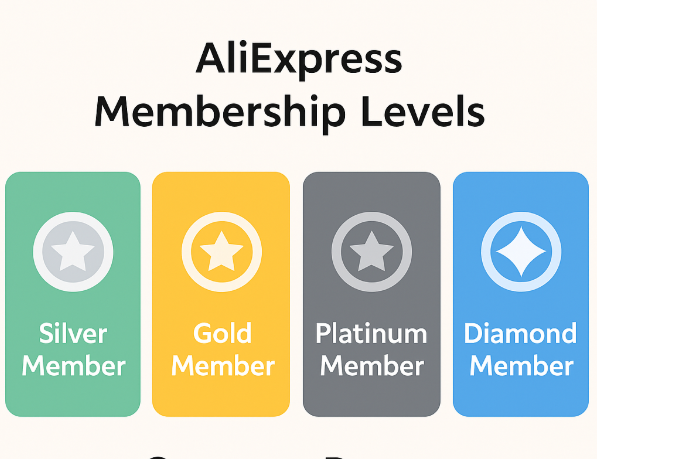
The program has four tiers: Silver, Gold, Platinum, and Diamond. Your level is recalculated monthly based on points accumulated in the previous 12 months. This means your level can go up or down depending on activity.
Key facts:
- All registered users start at Silver
- Points are based on a rolling 12-month window
- Level recalculation happens on the last day of each month
- New level takes effect on the 8th of the following month
- Refunded or fraudulent orders do not earn points
Membership levels and point thresholds
| Level | Points required | Discount on Top Weekly Brands |
|---|---|---|
| Silver | 1-100 | 5% |
| Gold | 101-500 | 8% |
| Platinum | 501-1,500 | 10% |
| Diamond | 1,501+ | 15% (up to 25% on select items) |
Practical example:
To reach Diamond (1,501 points) primarily through purchases, you would need to spend approximately $1,500 in a 12-month period (1 point per $1 spent). Earning additional points through reviews and daily visits can reduce this amount.

How to earn AliExpress member points
Points come from three sources: shopping, engagement (fan points), and promotions (bonus points).
Shopping points
| Action | Points earned | Limits |
|---|---|---|
| Spending on orders | 1 point per $1 | Max ~500 points per order |
| Buying from multiple categories in one day | Up to 5 points | Max 5 points per day |
Rules:
- Points are credited after you confirm receipt of the order
- Shipping costs and discounts do not count toward points
- Orders under $2 may not earn points
- Refunded orders lose their points
Fan points (engagement)
| Action | Points earned | Limits |
|---|---|---|
| Leave a product review | 1 point per review | Items must be $2+ |
| Daily visit to Member Center | 1 point | Max 10 points per month |
| Follow stores | 1 point | Varies |
| Post in AliExpress Club | 2 points | Max 10 points per month |
Fan points are capped, so engagement alone will not get you to Diamond. However, they help maintain your level if your purchase volume drops.
Bonus points (promotions)
During major sales events (11.11, Black Friday, Anniversary Sale), AliExpress offers bonus point promotions. These can include:
- Double points on purchases
- Bonus points for specific actions
- Points for participating in games or tasks
Check the Member Center before and during sales events to see available bonus point opportunities.
Points vs coins: understanding the difference
AliExpress has two separate reward systems that are often confused:
| Feature | Member Points | AliExpress Coins |
|---|---|---|
| Purpose | Determine membership level | Currency for discounts |
| How earned | Purchases, reviews, visits | Daily check-ins, games, tasks |
| How used | Automatically unlock level benefits | Apply at checkout for % off |
| Expiration | 12-month rolling window | 6 months from earning |
| Location | Member Center | Coins page, app games |
Points
Points determine your Silver/Gold/Platinum/Diamond level and unlock benefits like fast refunds. You cannot spend points directly.
Coins
Coins are a separate currency earned through the mobile app (daily check-ins, Play & Earn games, completing tasks). Coins can be applied at checkout for discounts on eligible items (look for “Extra % off with coins” tags).
Common confusion:
Some users expect their member points to work as currency. They do not. Points only affect your membership level. For checkout discounts, you need coins.
Benefits at each membership level
All levels (Silver, Gold, Platinum, Diamond)
| Benefit | What you get |
|---|---|
| Birthday rewards | Coupons and special offers on your birthday (set birthdate in profile 2+ days before) |
| Anniversary rewards | Coupons on your AliExpress registration anniversary |
| Level-up rewards | One-time coupons when advancing to a new tier (issued 8th-14th of following month, valid 7 days) |
Gold level and above
| Benefit | What you get |
|---|---|
| Exclusive member prices | Discounts on select products (marked “Member Price”) |
| Top Weekly Brands | 8% off (Gold), 10% off (Platinum), 15-25% off (Diamond) on featured brand items |
Platinum and Diamond only
| Benefit | What you get |
|---|---|
| Fast refunds | Expedited refund processing (Platinum: up to $25, Diamond: up to $100) |
| Exclusive event benefits | Early access to deals, higher-value coupons during sales |
| Limited daily coupons (Diamond) | Access to high-value coupons with limited quantities |
Fast refunds explained
Fast refunds is the most valuable benefit for Platinum and Diamond members. Here is how it works:
Standard refund process:
- You request a refund
- Seller reviews and approves/disputes
- If approved, AliExpress processes refund
- Money returns to your payment method (3-20 days)
Fast refund process (Platinum/Diamond):
- You request a refund
- Seller confirms return tracking number
- Refund is processed immediately
- Money returns to your payment method (typically 3-5 days)
Limits:
| Level | Fast refund limit |
|---|---|
| Platinum | Orders up to $25 |
| Diamond | Orders up to $100 |
Requirements:
- Order value must be within your level’s limit
- You must provide a valid return tracking number
- The feature is not available for all dispute types
Practical value: If you frequently return items or encounter issues with orders, fast refunds saves significant time. For a $30 item, a Diamond member gets their money back in days instead of potentially weeks.
How to maintain your level (avoiding point decay)
Since points are calculated on a rolling 12-month basis, your level can drop if you do not maintain activity.
Example scenario:
- In January 2025, you have 600 points (Platinum level)
- 400 of those points came from purchases in January 2024
- When January 2024 points expire in February 2025, you drop to 200 points (Gold)
Strategies to maintain your level:
| Approach | Monthly effort |
|---|---|
| Minimum engagement | 10 fan points (daily visits + reviews) |
| Moderate shopping | ~$40-50/month in purchases (~40-50 points) |
| Seasonal focus | Heavy purchases during sales, light maintenance otherwise |
To maintain Diamond (1,501+ points):
- Average spend of ~$125/month, or
- Heavy spending during 2-3 major sales events plus regular engagement
If maintaining Diamond is not practical, Platinum (501-1,500 points) offers most of the valuable benefits at a lower threshold.
How to check your membership level
On desktop (website)
- Log in to AliExpress
- Click your profile icon (top right)
- Select “My AliExpress”
- Click “Member Center”
- View your current level, points balance, and available rewards
On mobile app
- Open the AliExpress app
- Tap “Account” (bottom right)
- Tap “Member Center” (usually near the top)
- View your level and points details
The Member Center shows:
- Current level and tier badge
- Points balance
- Points needed for next level
- Available coupons and rewards
- Points history
When points are calculated and updated
| Event | Timing |
|---|---|
| Points from purchase | Credited after you confirm receipt |
| Monthly level calculation | Last day of each month |
| New level takes effect | 8th of the following month |
| Level-up coupons issued | 8th-14th of the following month |
| Level-up coupon validity | 7 days from issue |
Example timeline:
- December 31: Points calculated, you qualify for Platinum
- January 8: Platinum level becomes active
- January 8-14: Level-up coupons available to claim
- January 21: Unclaimed coupons expire
Action: Check the Member Center on the 8th of each month to claim any level-up rewards before they expire.
Final Thoughts
The AliExpress Member Program rewards consistent shoppers, but the benefits vary in practical value. Fast refunds (Platinum and Diamond) is genuinely useful for anyone who occasionally needs to return items. The percentage discounts on “Top Weekly Brands” are more limited since they only apply to selected products, not your entire cart.
If you shop on AliExpress regularly (a few orders per month), tracking your points and maintaining at least Platinum level is worthwhile for the fast refund access. For occasional shoppers, the program runs in the background and the birthday/anniversary coupons are a nice bonus without requiring active management.
FAQ
1. What is the difference between AliExpress points and coins?
Points determine your membership level (Silver, Gold, Platinum, Diamond) and unlock benefits like fast refunds. They cannot be spent directly. Coins are a separate currency earned through the app that can be applied at checkout for discounts. They are two different systems.
2. How do I reach Diamond membership?
You need 1,501+ points accumulated over the past 12 months. The fastest way is through purchases (1 point per $1 spent). Engagement activities (reviews, daily visits) add supplemental points but are capped at around 20 per month.
3. Do AliExpress member points expire?
Points are calculated on a rolling 12-month basis. Points earned more than 12 months ago no longer count toward your level. Your level is recalculated on the last day of each month, so points can “expire” in the sense that old activity drops off.
4. What is the fast refund benefit?
Platinum members can get expedited refunds on orders up to $25. Diamond members can get expedited refunds on orders up to $100. Once you provide a return tracking number, the refund processes immediately instead of waiting for the seller’s timeline.
5. Why didn’t I receive points for my purchase?
Points are credited after you confirm receipt of the order, not at the time of purchase. Refunded orders, orders under $2, and certain promotional orders (free gifts, deposits) do not earn points. Shipping costs and discounts do not count toward the $1 = 1 point calculation.

Leave a Reply