

Shopping on a global marketplace like AliExpress means connecting with sellers from around the world. Effective communication is one of the most important tools you have to ensure a smooth and successful purchase. Whether you have questions about a product, need to modify an order, or encounter an issue after delivery, knowing how to message the seller is key.
This guide provides a comprehensive walkthrough of how to contact sellers on AliExpress. We’ll cover the step-by-step process for both the website and the mobile app, explain when and why you should reach out, and offer practical tips for getting the answers and resolutions you need.
Why and When to Contact a Seller on AliExpress
Proactive communication can prevent misunderstandings and provide crucial evidence if a dispute arises later. AliExpress values buyers who attempt to resolve issues directly with sellers first.
Common Reasons to Message a Seller:
- Before Buying:
- To ask for real photos of a product, especially if it has few or no reviews.
- To clarify doubts about sizing, materials, or product specifications.
- To confirm if a product is an original or a replica.
- To inquire about specific shipping methods or delivery times.
- During Order Processing:
- To request a change in size, color, or shipping address right after ordering.
- To ask the seller to accept a cancellation request you’ve initiated.
- After the Order Has Shipped:
- If your tracking information hasn’t updated for a long time.
- If the tracking shows an unusual status, like “Shipment Cancelled” or “Returned to Sender.”
- After Receiving Your Purchase:
- If the item is not as described, is damaged, or is the wrong product. Contacting the seller before opening a formal dispute is highly recommended.
How to Contact a Seller: Step-by-Step Instructions
You can easily message a seller from their product page or directly from your order list.
On the AliExpress Website
Before Making a Purchase:
- Navigate to the product page of the item you’re interested in.
- On the left side of the page, under the seller’s store name, click the “Contact” button.
- A chat window will open, automatically referencing the product you are viewing. Type your message and send it.
During or After a Purchase:
- Log in to your account, hover over “Account,” and click on “Orders.”
- Find the relevant order in your list.
- Click the “Contact Seller” button next to the order details. This will open a chat window directly linked to that specific purchase.
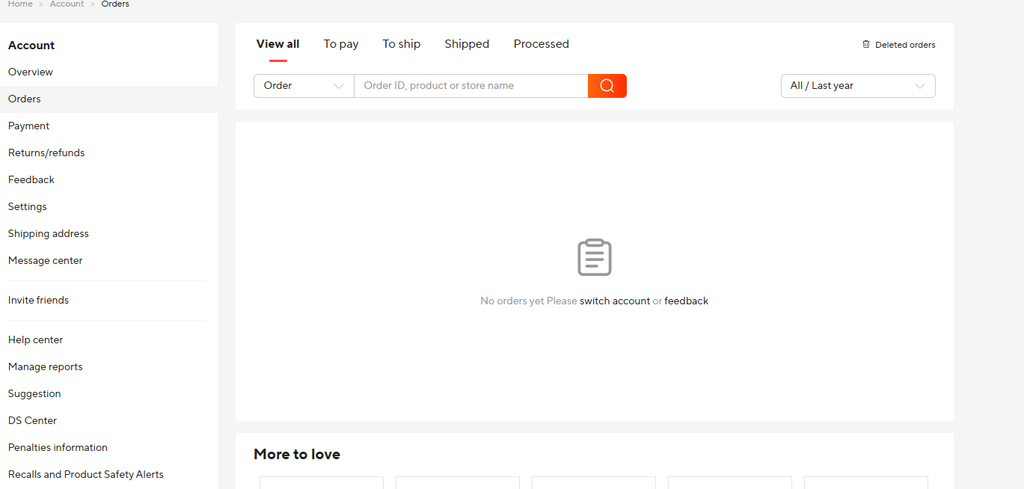
All your conversations can be found in your “Message Center,” accessible from your account dashboard.
On the AliExpress App
Before Making a Purchase:
- Go to the product page.
- At the bottom-left of the screen, tap the “Chat” icon (it looks like a speech bubble).
- The chat window will open for you to type your question.
During or After a Purchase:
- Open the app and tap “My Account” in the bottom-right corner.
- Go to the “Orders” section and select the order you have a question about.
- Scroll down and tap the “Send Message to Seller” button to start a conversation.
Managing Your Messages
Your communication with sellers is organized and easy to access.
- Message Center: All conversations are stored in your Message Center. On the website, it’s under your account menu. On the app, it’s the “Messages” icon in the bottom navigation bar.
- Read Receipts: You can see if a seller has read your message. The status will change from “Unread” to “Read” beneath your message.
- Attaching Images: To send a picture (like a photo of a defect), click the “+” icon in the chat window and select the image you want to upload. Note that you cannot send videos through the chat; videos can only be uploaded during a formal dispute. If you must send a video, you can ask the seller for their email address.
Language and Translation Tips
Don’t let a language barrier stop you. AliExpress has a built-in auto-translation feature that translates your messages for the seller and their replies for you.
For Better Clarity
If you are comfortable with English, using it can sometimes prevent misunderstandings that might arise from automated translations, as context can occasionally get lost. However, for most conversations, the auto-translator is sufficient.
Should you write in English?
You don’t have to. You can write in your native language, and the system will handle the translation.
What to Do If a Seller Doesn’t Respond
Patience is important, as time zone differences mean sellers may not reply immediately. It’s reasonable to wait 24-48 hours for a response.
- Before Buying: If a seller doesn’t answer your pre-sale questions, it might be a red flag about their customer service. It’s often best to find another store that is more responsive.
- After Buying (Order Issues):
- Give Them Time: Wait a couple of days, especially considering weekends or public holidays in China (like Chinese New Year).
- Follow Up Politely: Send a brief follow-up message.
- Open a Dispute: If the seller remains unresponsive and your buyer protection period is running out or you have a serious issue with a received item, it’s time to open a formal dispute. AliExpress will step in to mediate.
A Note on Blocked Words
AliExpress automatically blocks certain words like “WhatsApp” or “email” in chat to prevent transactions from moving off-platform, which would void your buyer protection. If your message fails to send, check for such words and rephrase it.
Conclusion
Messaging a seller on AliExpress is a simple but powerful tool for ensuring you get exactly what you want. By being clear, polite, and proactive, you can resolve questions, fix order mistakes, and handle issues effectively. Remember that your chat history serves as valuable evidence, so always communicate through the platform. With these tips, you can navigate your purchases with greater confidence and build positive relationships with sellers.

Leave a Reply